TABLE OF CONTENTS
- Visualization on the display
- Electrical Installation
- Current output settings
- Error
- Connection with the TME
- Parameterization
- Error
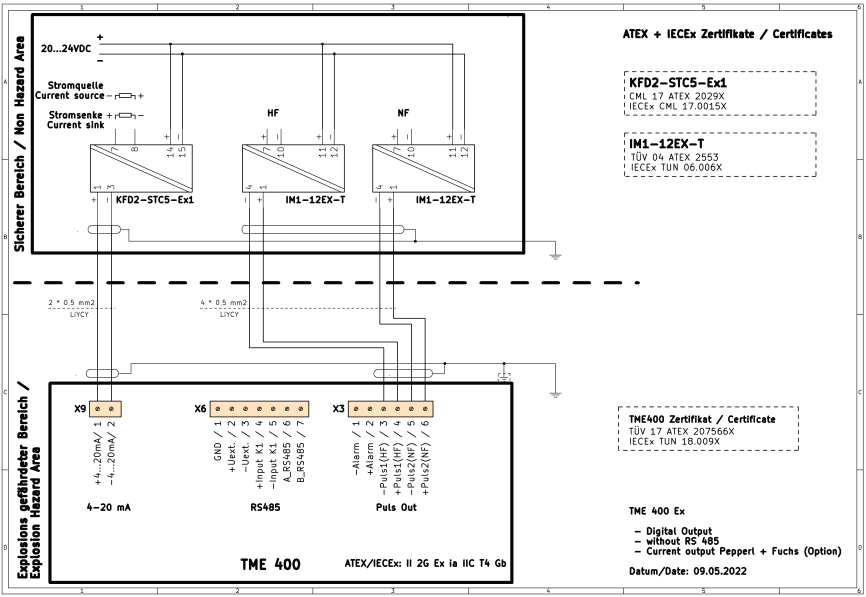
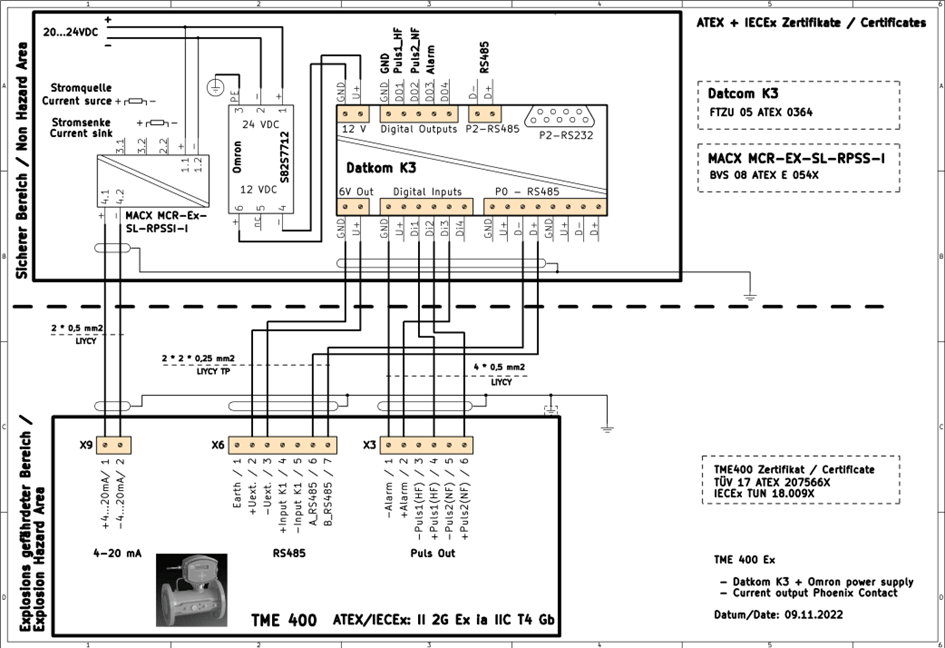
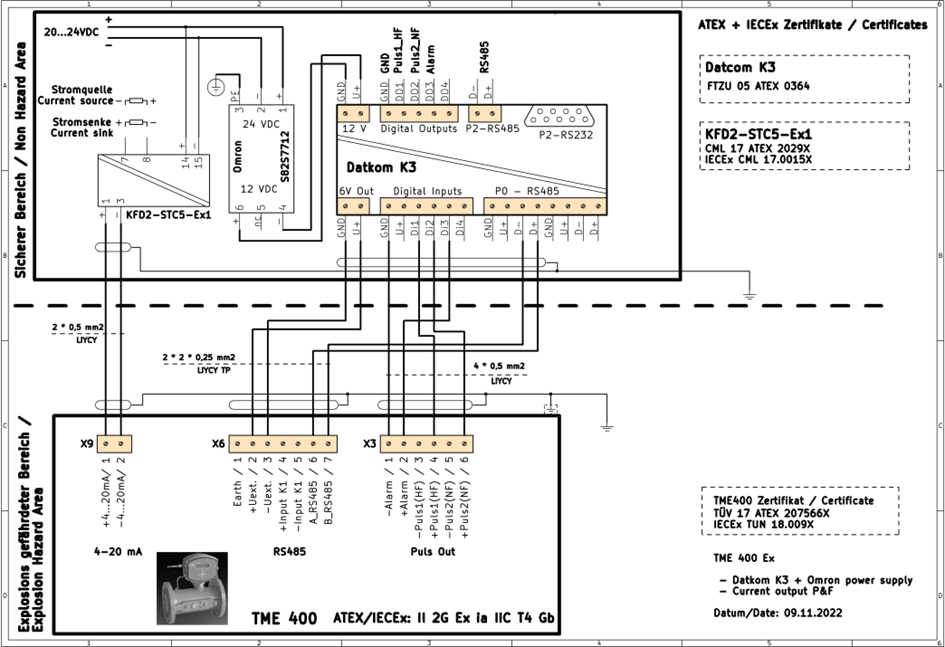
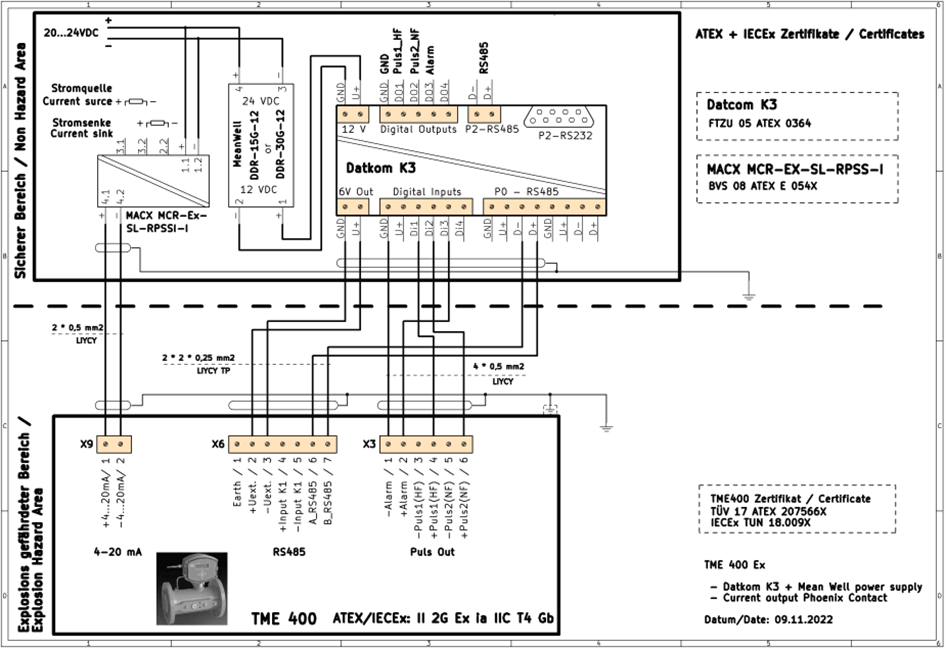
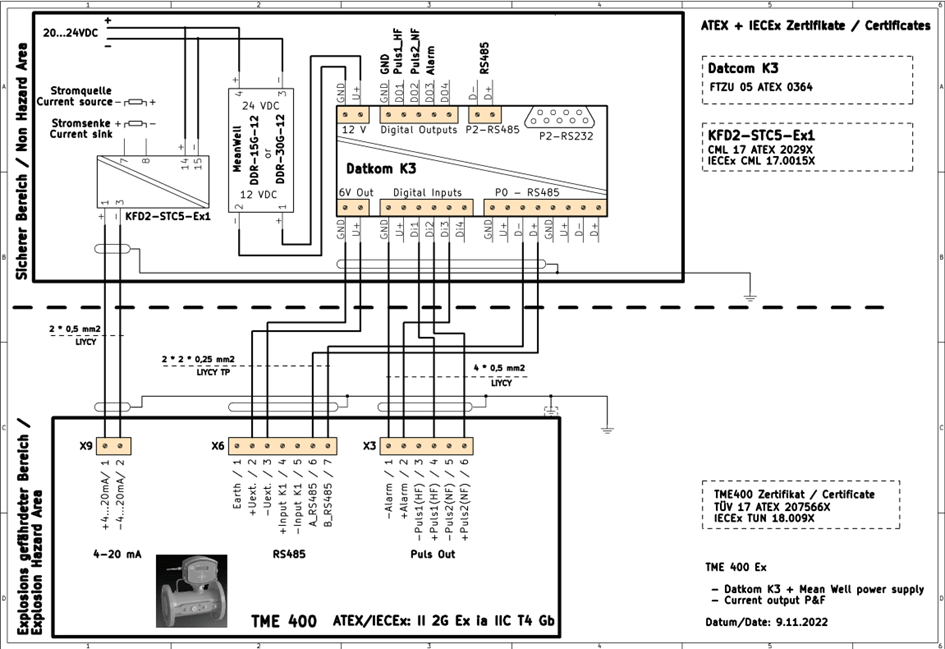
- Wiring diagrams
Note
The information in this Quick Start Guide is intended only as an aid and collection of the information contained in the respective manual. All instructions as well as safety precautions and warnings in the manuals must therefore be observed!
Visualization on the display
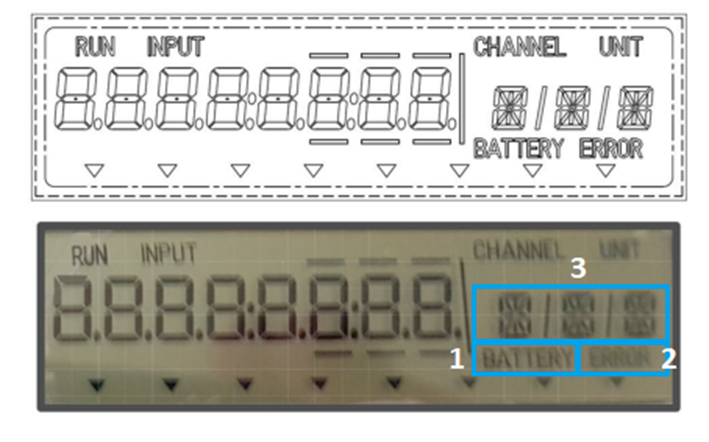
When running on battery, the "Battery" icon (1) flashes. This symbol is not visible when supplied via an external power supply.
If there are acute errors, the "Error" icon (2) is displayed.
Coordinates and the units of the measured values can be seen in display area (3).
To display the different coordinates, use the arrow keys below the display.
Left/right arrow key: Change the coordinate letter
Arrow key up/down: Change the number of coordinates
Checking the parameters against the displayed values and the parameter log.
The default settings of the TME are documented on the protocol from the factory.
Electrical Installation
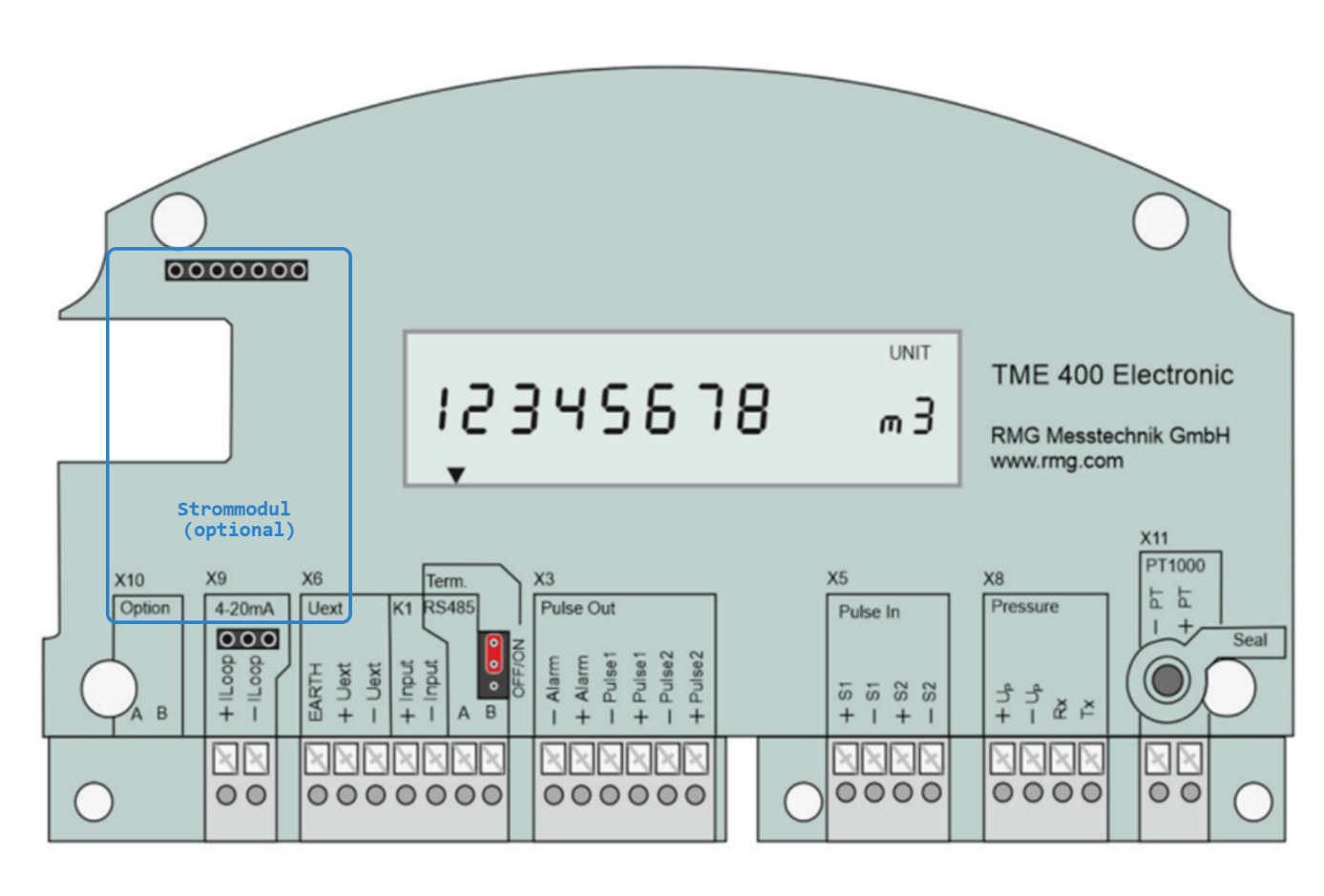
Terminal descriptions
X10 Optional Expansion
X9 connector for 4-20mA – Optional power module required
X6 External power supply (see schematics)
X3 Pulse Out
The alarm output works according to the quiescent current principle. The switching contact is closed in undisturbed operation.
- -Alarm - Alarm output negative pot.
- +Alarm – Alarmausgang positives Pot.
On this output, the pulses arriving at pulse input 1 are output synchronously and with a pulse width of 1ms.
- -Pulse 1 – RF output neg. Pot.
- +Pulse 1 – RF output pos. Pot.
Output pulses are output at these terminals depending on the change in the volume flow. With pulse output factor, the number of output pulses can be weighted in relation to the volume increase
- -Pulse 2 – LF output neg. Pot.
- +Pulse 2 – LF output pos. Pot.
The factorization of the output pulses is carried out via the coordinate A-11. The standard value is 1imp/m³.
This coordinate is also noted in the acceptance test certificate to check the weighting of the pulses and the digital output 2 mode.
The values can be changed via the input keys of the display or via the RMGViewTME software.
X5 Pulse In
"Pulse In" (terminal block X5) can be used to read in counting pulses proportional to the operating volume flow from an encoder with 1 or 2 frequency outputs (main encoder and, if necessary, second redundant encoder). Sensor 1 is connected to the terminals via "+S1" (positive potential) and "-S1" (negative potential), and encoder 2 is connected to "+S2" and "-S2". This is particularly necessary for the TME 400-VCF variant, which is operated under custody transfer. The sensor types can be selected in the coordinates Z26/27 (see chapter 4.3.3.10 Settings). Pulse input 2 is only active if a 2-channel volume counting mode is selected (coordinate Z25).
X8 Pressure
A pressure sensor can be connected to the four terminals of the X8 terminal block: "+Up" positive and "-Up" negative voltage supply for pressure sensor; "RX" or "TX" are the data received or transmitted by the pressure sensor.
pressure sensor sent serial data.
X11 PT1000
The temperature sensor, a Pt1000 is connected to the terminals of the terminal block X11 in two-wire connection. Pressure and temperature sensors are usually only used in the TME 400-VC and TME 400-VCF variants.
Current output settings
When using an optional power module, the following parameters can be set under the coordinates below.
Coordinates
F03 – Power source:
- 0 = Default
- 1 = Operating Flow
- 2 = Frequency
- 3 = Calibratierung 4mA
- 4 = Calibratierung 20mA
- 5 = Standard flow rate
- 6 = Temperatur
- 7 = Pressure
F04 Phys. Minimum Current Output Phys. Minimum value (required for display in RMGViewTME)
F05 Phys. Maximum Current Output Physical. Maximum value (required for display in RMGViewTME)
F06 Current Default: Current Output Default Value (for Test Purposes)
F07 Current attenuation The current output is damped by an averaging.
- A value of 0 does not correspond to attenuation.
- A value of 0.99 causes a strong averaging
Error
These are visible under the coordinate G-01 and are displayed in a numbering. For more information, see Helpdesk : RMG Support (freshdesk.com)
Connection with the TME
To enable communication with the TME400, the TME400 has a passive RS485 interface on terminal X6, i.e. the interface must be supplied externally via Uext or Iext. More information on this can be found in the circuit diagrams.
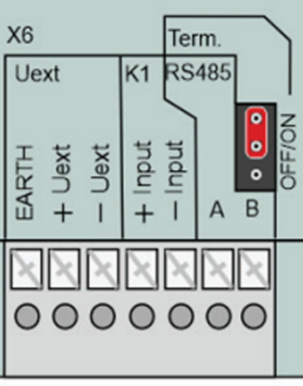
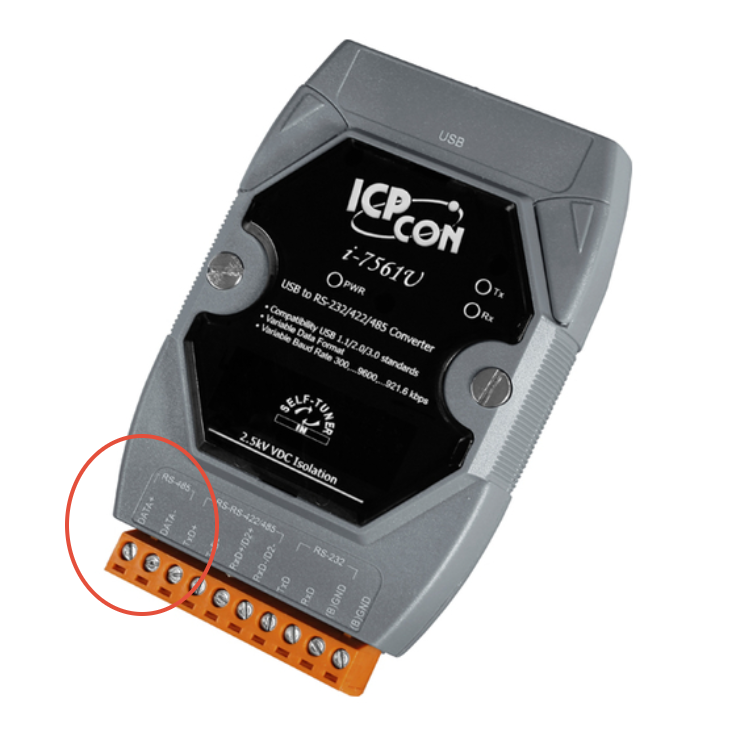
A temporary solution for analyses via the RMGViewTME software can be implemented by connecting a converter such as the ICP-CON-i-7561 to the TME via the X6 (A&B) terminal.
Data+ = A (TME Clamp X6)
Data- = B (TME Clamp x6)
The connection to the laptop would be guaranteed via the USB connection of the ICP-CON.
Parameterization
Under the following coordinates, the parameters of Modbus communication are set via the RS485 interface. Here, the TME is pre-configured with the default listed parameters.
Default
H01 - 38400
H02 – 8N1
H03 – Modbus RTU
H04 - 00001
H05 - 00001
H01 Baudrate
0 2400 fps
1 9600 bps
2 19200 fps
3 38400 Bps (Default)
H02 Interface Parameters
0 8N1 (Default)
1 8E1
2 8O1
3 7N1
4 7E1
5 7O1
H03 RS485 Protokoll
0 Off
1 Modbus RTU (Default)
2 Modbus ASCII
The Modbus ID is set via the coordinate H04 (default is 1)
The Modbus register offset is set via H05 (default is 1)
Error
Listed under the following links:
Helpdesk : RMG Support (freshdesk.com) für TME400-VC/VCF
Helpdesk : RMG Support (freshdesk.com) für TME400-VM/VMF
Wiring diagrams

Was this article helpful?
That’s Great!
Thank you for your feedback
Sorry! We couldn't be helpful
Thank you for your feedback
Feedback sent
We appreciate your effort and will try to fix the article